


HPC for CAE presents dual challenges: high infrastructure costs and the need for specialized IT staff burden organizations, especially SMEs, hindering innovation.
Qarnot HPC platform directly addresses the daily frustrations CAE engineers face with traditional HPC by offering a cloud-native platform that eliminates technical complexities and the need for specialized expertise. It is built to abstract away the intricacies of cluster management, software configuration, and infrastructure, providing an intuitive environment where engineers can focus solely on their simulations.
Crucially, this ease of use does not come at the expense of performance. Qarnot’s HPC platform provides access to cutting-edge cloud infrastructure optimized for CAE workloads, ensuring rapid execution of complex simulations and delivering results quickly. A robust infrastructure that is continuously proving itself, being relied upon by our clients in sectors such as aerospace, automotive, energy and more.
Qarnot’s HPC platform reason to be is to empower CAE engineers to focus entirely on innovation and engineering, making the power of HPC as accessible and straightforward as any essential tool.
How does this platform expands on Qarnot existing services ?
- Reduced time to value
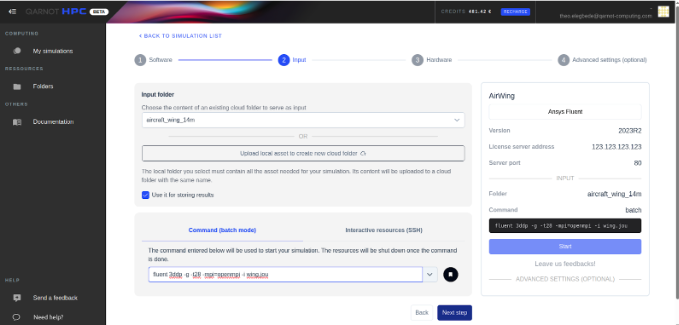
- By redesigning the entire simulation submission process, we let you configure your solver, import your inputs, configure your cluster and launch your case in just a few clicks, made simple for any CAE engineer.
- New real-time monitoring
- Use the file tailing tab to consult the logs of your solvers as they are generated
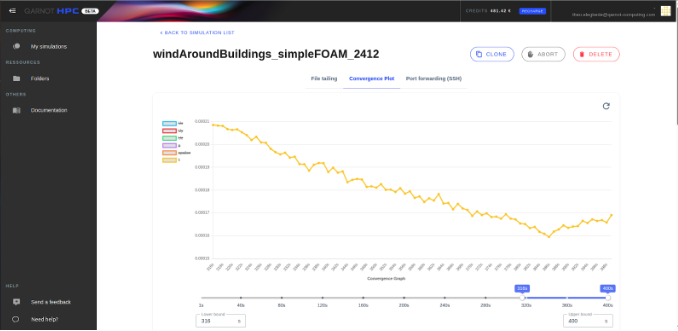
- Follow the convergence of your case through the convergence plot
- By taking advantage of the monitoring, designed for the CAE use case, you are no longer in the dark during your simulation, which allows you to quickly re-evaluate your simulation health, and iterate faster during your projects.
- Qarnot new HPC Platform remains compatible with our SDK
- Automize your simulation submissions and processes through our SDK and API so that Qarnot adapts to your workflows, and not the other way around.