
Open Compute Project Foundation
The following is a set of guidelines to make our brand a consistent, strong identity for Open Compute Project.
Updated March 2026

At a glance
The Essentials
“E”
Clear space
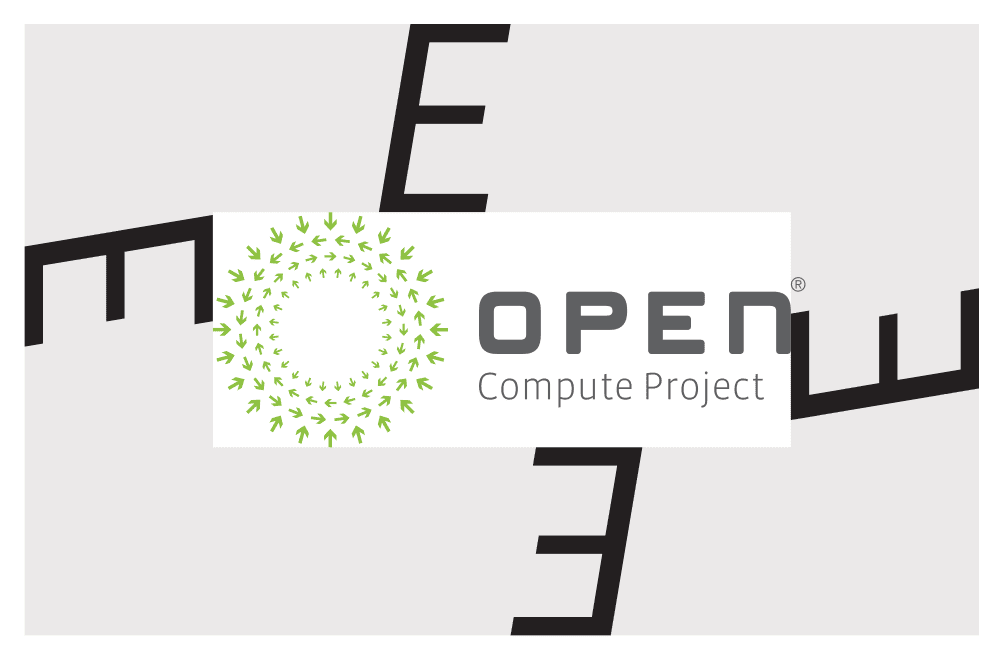
Keep space around every logo equal to the height of the “E.”
1 in
Minimum print size
Logos should be at least 1 inch wide in print.
30 px
Minimum online size
Logos should be at least 30 pixels tall on screen.
2 in
Small-use version
Use the small-use optimized logo only at sizes under two inches wide.
Do
- Use the official logo files provided by the OCP Foundation, exactly as provided.
- Keep the full-color arrangement: gray text and green arrows.
- Use a single-color version (green, gray or white) when full color isn’t possible.
- Ensure sufficient contrast and visibility in every application.
- Get written permission from the OCP Foundation before using the Foundation logo.
Don’t
- Swap the logo’s color arrangement.
- Redraw, retypeset or recreate any portion of a mark, or change its typeface.
- Apply shadows, gradients, outlines or other effects.
- Apply recognition or program logos to hardware, packaging or facilities unless the applicable license permits it.
- Use marks in ways that imply OCP endorsement of an entire company or of products outside the approved scope.
01 · Foundation
Logo Usage
The OCP Foundation logo serves as the primary visual that embodies the characteristics of the Open Compute Project. Every deviation from the master logo dilutes our brand.
Primary Logo
Use of the ® symbol in this document indicates that a mark is registered with the United States Patent and Trademark Office and likely is registered in other jurisdictions.
For materials intended for a global audience which include the ® symbol, add a general trademark statement where possible:
“Registered with the United States Patent and Trademark Office and may be registered in other jurisdictions.”
For jurisdiction-specific materials intended for use outside the US, please check the TM notices table for guidance on using ™ or ® symbols, available in the OCP Trademark Usage Guidelines.
Structure
Our logo is made up of two elements displayed in a specific arrangement: the “arrows” and the “Open Compute Project” wordmark. With few exceptions, this is how it should be displayed regardless of media or application. The OCP family of logos are made from custom art, and therefore should not be used in any other font when not using the art.
Permission required: This version is intended for use on all sales, marketing and awareness activities. It is appropriate for use on websites, advertisements, tradeshows, presentations, social media and other sales enablement materials, with written permission from the Open Compute Project Foundation.
Example uses / permission required
- Marketing and sales materials
- Customer-facing materials
- Tradeshow booths, signage and materials
- Campaign materials
- Branded corporate templates
- Permanent signage or fixtures
- Other uses deemed appropriate by the OCP Foundation
Clear Space
Our logos require space between them and other design elements. This padding helps to keep them visible and recognizable. The amount of space can be generous, but can’t be too small. A good way of knowing if you’ve allowed enough space is to measure using the height of the “E.” Apply the same space rule to all variations of the logo.
At Small Sizes
We created a version of our logo that is optimized for use at small sizes or on low fidelity applications. This “small use optimized” version has enlarged cutouts in some of the letters to keep them looking sharp, even when small.
As a general rule, this version should not be used at sizes over two inches wide.

Minimum size: 1 inch wide for print · 30 pixels tall for online
Full Color
Our full-color logo uses our two main brand colors: gray text and green arrows. Please do not swap this color arrangement.
Single Color
While we are partial to green and gray, it isn’t always possible to reproduce our logo in full color. When those times arise, please use a single color version in green, gray or white. The rule for creating a single-color version is easy: choose a color and use it (at the same opacity/tint/saturation) for every element in the logo.


02 · Membership
Membership Logos
We are one community. We use our OCP Foundation logo coupled with our membership tiers in standard headline and body font, depending on the usage.
Please note: we do not allow OCP members to use the OCP Foundation Logo without express written permission. If your organization would like to use the OCP Foundation Logo please contact Dirk Van Slyke or Michael Schill.
Tiered Membership
OCP Tiered Membership Logos identify organizations that actively support the Open Compute Project through participation, contribution, and advocacy.
Each membership tier (Startup, Bronze, Silver, Gold, and Platinum) represents a defined level of engagement and commitment to advancing open hardware and data center innovation.
Members can use their corresponding tiered membership logo on their website and printed collateral to indicate their membership level and active participation as long as their membership is active and in good standing. They cannot be used to brand hardware or indicate that product offerings are approved by OCP.
Orientation & Color
All OCP Tiered Membership Logos share a consistent structure, type treatment, and proportional system. The examples shown here illustrate correct usage of horizontal and vertical orientations, as well as approved color variants.
Each tier uses the same format and follows these standards. The only distinction between tiers is the color assigned to the membership level and the logos.
Usage guidelines
- Use the logo exactly as provided, without redrawing or changing the typeface.
- Both horizontal and vertical orientations are acceptable; choose the one best suited to your layout.
- Logos may appear in black on a white or light background, or in white on an OCP green background.
- Do not apply shadows, gradients, outlines, or other effects.
- Ensure sufficient contrast and visibility in every application.
Solution Provider
These are the logos that Solution Providers (SPs) can use. SPs can use either the Bronze, Silver, Gold or Platinum Level Logo along with the Solution Provider logo.
The background on the logos may not be white; permission must be obtained to change the background. The Foundation should be notified prior to any such use. You may use the vertical or horizontal logo. Either is acceptable.
The Solution Provider logos may only be used by authorized members.

03 · Recognitions
Recognitions
The Open Compute Project recognition logos designate products, facilities, and solutions that have successfully completed an official OCP review or appraisal process. Each recognition reflects verified alignment with open standards, best practices, and community-defined requirements. Together, these marks communicate varying levels of conformance and participation within the OCP ecosystem, helping end users, partners, and adopters easily identify the degree to which a product, site or program embraces OCP principles of openness, efficiency, impact, scalability, and sustainability.

OCP Accepted®
Organizations whose Products have met the requirements and have gone through the process to become recognized as OCP Accepted® will be issued the OCP Accepted® logo for use on their website and printed collateral to indicate that their product has been formally recognized as OCP Accepted®.
You can brand the product collateral when the product is recognized but not on the product. The mark cannot be used to sticker a product.
All use of the OCP Accepted® logo is subject to the OCP Accepted Certification Mark License.

OCP Ready®
Colocation data center operators whose facilities meet the OCP Ready® requirements and complete the process of self certification will be issued the OCP Ready® logo for use on their website and printed collateral to indicate that their data center has been formally recognized as OCP Ready®.
All use of the OCP Ready® logo is subject to the OCP Ready® Certification Mark License.
OCP S.A.F.E.™
The OCP S.A.F.E.™ mark identifies organizations and products that participate in OCP’s Security Appraisal Framework and Enablement program, an initiative designed to promote transparency, consistency, and collaboration around security practices within the OCP ecosystem.
Use of the logo is reserved for participants who have completed the required assessment and been formally recognized by OCP as meeting the program’s baseline criteria for security readiness and enablement.
Approved participants may display the logo on digital and printed collateral, including product literature, websites, and presentations that reference the appraised product or solution.
Recognition General Guidelines
- Recognition logos must be reproduced exactly as provided, without modification to color, proportion, or typography.
- Usage is limited to collateral and digital contexts directly associated with the specific product, facility, or solution that has been formally recognized by OCP.
- Logos may not be applied to physical hardware, packaging, or facilities unless explicitly permitted within the applicable license agreement.
- Marks may not be used in ways that imply OCP endorsement of an entire company or of products outside the approved recognition scope.
04 · Programs & Initiatives
Programs & Initiatives
The Open Compute Project (OCP) programs and initiatives showcase the Community’s ongoing efforts to accelerate innovation, knowledge-sharing, and adoption of open technologies. Each program supports a distinct aspect of the OCP mission, from education and collaboration to hands-on experience and emerging-technology exploration. Collectively, these initiatives expand access to OCP resources, strengthen global engagement, and highlight real-world impact across industries and regions.

OCP Experience Center™
An OCP Experience Center™ provides a physical and virtual environment for showcasing OCP-recognized hardware, solutions, and technologies in real-world operation. These centers allow adopters, channel partners, and the broader community to explore the benefits of open design first-hand, from performance and energy efficiency to deployment flexibility.
Each OCP Experience Center™ is operated by an approved OCP Solution Provider or Partner Organization and serves as a hub for collaboration, training, and demonstration. By hosting live equipment and offering guided sessions, the OCP Experience Center™ plays a vital role in expanding access to OCP innovation across global markets.

OCP Academy™
The OCP Academy™ is the Open Compute Project’s education and training platform, developed to expand the Community’s technical knowledge and grow the next generation of open-hardware professionals. Through curated courses, webinars, and learning modules built on OCP’s extensive library of specifications and real-world deployments, the OCP Academy™ provides structured learning opportunities for individuals and organizations seeking to deepen their understanding of open data center design, sustainability, and operations.
OCP Future Technologies Symposium™
The OCP Future Technologies Symposium™ is a recurring global event designed to connect academia, startups, and industry leaders working on emerging technologies that could influence future OCP projects.
Hosted alongside OCP Summits, the Symposium serves as a forum for research presentation, early-stage collaboration, and the exchange of ideas through technical papers, lightning talks, and panel discussions exploring topics such as AI hardware design, advanced cooling, sustainable materials, and next-generation data center architectures.
The OCP Future Technologies Symposium™ reinforces OCP’s role as an incubator for innovation and as a bridge between research and real-world implementation.
OCP Future Technologies Initiative™ (FTI)
The OCP Future Technologies Initiative™ extends the momentum of the OCP Future Technologies Symposium™ into a year-round, collaborative framework. It brings together researchers, engineers, and industry partners to explore, evaluate, and mature emerging technologies that may become future OCP projects or specifications.
Through dedicated workstreams and regular community calls, the OCP Future Technologies Initiative™ supports open dialogue, prototype development, and early validation of concepts such as advanced packaging, new compute architectures, sustainable manufacturing, and security innovation.
The OCP Future Technologies Initiative™ embodies OCP’s forward-looking spirit, transforming early-stage research into practical, scalable solutions.

OCP Innovation Village™
The OCP Innovation Village™ is an interactive showcase area featured at OCP Summits and regional events, designed to highlight emerging technologies, startups, and early-stage concepts shaping the future of open computing.
This program offers innovators and new entrants to the OCP ecosystem the opportunity to demonstrate products, prototypes, and research that align with OCP principles of openness, efficiency, and scalability.
By connecting entrepreneurs, researchers, and established OCP members in a shared environment, the Innovation Village promotes collaboration, visibility, and community-driven innovation within the global open hardware landscape.
Programs & Initiatives General Guidelines
The following rules apply to all OCP Programs & Initiatives logos, including OCP Academy™, OCP Experience Center™, the OCP Future Technologies Symposium™ and OCP Future Technologies Initiative™, and the OCP Innovation Village™. These marks represent official OCP Community programs and may only be used in authorized contexts that support their respective missions.
- Always use the official logo files provided by the OCP Foundation. Do not redraw, typeset, or recreate any portion of the mark.
- Logos must appear only in approved color versions and on appropriate backgrounds that ensure sufficient contrast and legibility.
- Maintain the required clear space around the logo, equal to the height of the letter “E” in “Compute.”
- Minimum size: 1 inch wide for print or 30 pixels tall for digital applications.
- Do not alter color, typography, or proportions; avoid shadows, outlines, or gradients.
- Logos may not be applied to hardware, packaging, or unrelated commercial materials.
- Use is limited to communications, collateral, or signage directly associated with the respective OCP program or event.
- Any third-party or co-branded use requires prior written approval from the OCP Foundation.
05 · Color Guide
Color Palette
Colors are the most basic and emotive shortcut to use in design. From the beginning, green and gray have been a mainstay of our identity, and we’ll continue to build on it. We want people to instinctively link those colors with the Open Compute Project.
Primary colors
OCP Green
#8DC63F
RGB (141, 198, 63)
CMYK (50, 0, 99, 0)
OCP Gray
#5F6062
RGB (95, 96, 98)
CMYK (68, 58, 52, 9)
White
#FFFFFF
RGB (255, 255, 255)
CMYK (0, 0, 0, 0)
Example uses: headlines, subheadlines, accents and body copy.
Secondary colors
#343895
RGB (52, 56, 149)
CMYK (93, 83, 1, 2)
#262673
RGB (38, 38, 115)
CMYK (96, 87, 6, 18)
#19194D
RGB (25, 25, 77)
CMYK (95, 87, 15, 39)
#F6B71C
RGB (246, 183, 28)
CMYK (1, 26, 93, 1)
#B98C2E
RGB (185, 140, 46)
CMYK (11, 33, 91, 16)
#7B5E26
RGB (123, 94, 38)
CMYK (26, 43, 90, 35)
#C87729
RGB (200, 119, 41)
CMYK (5, 52, 93, 10)
#653A05
RGB (101, 58, 5)
CMYK (21, 58, 94, 51)
#281702
RGB (40, 23, 2)
CMYK (48, 67, 80, 76)
06 · Typography
Typography
Primary typeface
Franklin Gothic
Franklin Gothic is a bold, sans serif typeface. It’s named after Benjamin Franklin. This modern type is hugely employed in press and ads.
Weights: Regular / Book and Medium.
Aa
Regular / Book · 400
Sixty-five rackers borrowed a famous jet and quickly zipped out of sight.
ABCDEFGHIJKLMNOPQRSTUVWXYZ
abcdefghijklmnopqrstuvwxyz
0123456789 & ! ? @ # %
Medium · 500
Sixty-five rackers borrowed a famous jet and quickly zipped out of sight.
ABCDEFGHIJKLMNOPQRSTUVWXYZ
abcdefghijklmnopqrstuvwxyz
0123456789 & ! ? @ # %
Alternate typeface
Open Sans
Open Sans is a humanist sans serif typeface.
Regular

Example hierarchy
Headline
Page Title
Subheadlines
Body copy is set in sentence case at a comfortable reading size, never below the minimums listed in the tips.
Labels, call-outs
Titles and block text
Tips
Headlines and subheadlines
- Letter-spacing (tracking) set to 250. For longer content where type breaks onto 3 to 4 lines, letter-spacing can be decreased for improved readability.
- All caps.
Body copy
- Minimum size for standard web copy: 14pt.
- Minimum size for print copy: 7pt.
Questions about using OCP marks?
If you have questions